
Tuesday, March 31, 2009

Sunday, March 29, 2009
Wireframes
Wireframe # 1 (below):
Based (more or less) on the 12-column, 960px wide format. Navigation in blue.

Wireframe #2 (below):

Wireframe #3 (below):
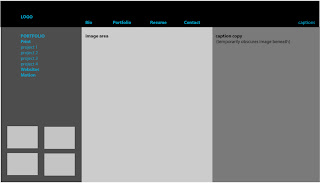
Based (more or less) on the 12-column, 960px wide format. Navigation in blue.

Wireframe #2 (below):

Wireframe #3 (below):

Wednesday, March 25, 2009
Colors, Typefaces, Logo (Final)


Wednesday, March 11, 2009
Interface & Information Architecture, Part II

Schematic: Defines placement of global elements (repeat on every page in the site), navigation, variable content (i.e. projects) on every page, as defined in the sitemap.
Page size: 800x600 max; 730x400, recommended. A grid determines page layout, so that elements maintain a consistent position.
A portfolio site contains three types of material:
1. Unique page content (images accompanying captions.) When you start to layout the schematic, select your largest image and the longest project description – don’t want to discover halfway through something’s not going to fit in the layout.
2. Navigation (links to main groups; secondary navigation to maneuver around inside a group.) Generally, horizontal navigation works better when there are fewer items to navigate through. Vertical is more efficient when there are more items and their specific numbers vary.
3. Global Information (brand ID; contact information.)
Look and Feel: As the schematic takes shape, we almost inadvertently stumble into a Look and Feel of the site; type size and navigation have already fallen into place, now you just have to keep brand ID (style/theme?) and target audience (considered earlier in this blog) in mind.
Tuesday, March 10, 2009
Project Captions
Print:
Newsletter........................ Project: Nutrition Newsletter
Dimensions: 17”x11”, folds to 8.5”x11”
Objective: 2-color (duotone), 4-page newsletter.
Program: InDesign
Magazine.......................... Project: HOW Magazine
Dimensions: Cover and table of contents, 8.5”x11”; inside spread, 17”v11”, folds to 8.5”x11”
Objective: 4-color, redesign proposal. Graphics and typography to complement/coincide with copy provided.
Program: InDesign
Menu................................ Project: Restaurant Menu
Dimensions: 15”x5”, folding to 5”x5”
Objective: 4-color, menu proposal for Eno Restaurant. Typographical treatment of restaurant’s brand ID (determined by designer) to include logo, photo/illustrations which enhance creative symbolism.
Program: InDesign
Art Book........................... Project: Coffee-table Book
Dimensions: 8.5”x11”
Objective: 4-color, coffee-table book designed around a collection of Playbills and ticket stubs amassed over a period of 40 years.
Program: InDesign
Motion Graphics:
Gunfight........................... Project: Walk Cycle/Time
Dimensions: 550x400px
Objective: 40-60 second animation designed around the concept of time, featuring a walking figure. Audio optional.
Program: Flash
Egypt................................ Project: Slide Show
Dimensions: 800x600px
Objective: Slide show, emphasis on interactivity. Audio optional.
Program: Flash
Casino.............................. Project: Branching Story
Dimensions: 550x400px
Objective: Four possible resolutions to story premise. Emphasis on plot development through animation (over text) and interactivity. Color and design choices contribute to cohesive environment.
Program: Flash
Websites:
Resolution Movie............. Project: Movie Website
Dimensions: 1024x768px
Objective: Collaborative project between filmmakers and website designer to promote the film Resolution – a dark, espionage drama. Develop creative brief, site map, wireframe. Website’s imagery/theme based on Resolution’s premise.
Program: Dreamweaver
St. Andrew’s Church........ Project: Church Website
Dimensions: 1024x768px
Objective: Create an online presence (pro bono) profiling church’s mission and activities.
Program: Dreamweaver
Storytelling Arts............... Project: Storytelling Arts, a non-profit promoting the art of storytelling to teachers and school administrators.
Dimensions: 800x600px
Objective: Website design team worked closely with client to redesign their existing website. Previous website unsatisfactory on many levels – function, content, visual.
As Content Manager for the redesign team, responsibilities included maintaining an accurate inventory of assets (graphics and copy) to be featured on website.
As Production Manager’s Assistant, worked closely with Production Manager – primarily in regard to developing and adjusting production timeline.
Designed and produced (coded) interactive “Storytelling Voices” pages (featured) after coordinating studio time to accommodate storytelling artists and recording professionals.
Program: Dreamweaver
NJ Assoc. of Realtors...........Project: Interactive map [web address]
Dimensions: 800px
Objective: Select, size, crop geographic appropriate images featured on rollover.
Program: Photoshop/Dreamweaver
Monday, March 9, 2009
Interface & Information Architecture, Part I
Group:
My portfolio is not so voluminous that the groups are not self-evident: Print, Websites and Motion Graphics. Mixing my pieces up via other nomenclature would definitely confuse the user.
Site Map:

A site map is a flow chart representing every page in my portfolio. When I arrange my ideas logically, users will not feel lost as they navigate through the digital portfolio site.
Additionally, a site map will help me answer several questions before I start building: 1. Will the user go directly from the homepage to view the work (or will there be a second level of navigation to access each group?); 2. Will all the work in a group be equally available (no hierarchy) or do I want to guide the user’s experience in order to view specific pieces in a specific sequence?
A successful site map shows three things at a glance:
1. Grouping – In may case, Print, Websites and Motion Graphics
2. Hierarchy – Where each page fits within the site
3. Connections – What will link from each page? (Since I plan to create my digital portfolio in Flash, there will be no links to outside sites, yes?)
The site map will account for every page on my digital portfolio site: A homepage from which each group’s page will branch – Portfolio (Print, Websites and Motion Graphics); Global pages (1. Bio; 2. Resume; and 3. Contact) will be accessible from any page.
It’s crucial to keep the concept of modularity in mind when creating the digital portfolio. Can the different pages be easily updated as new projects accrue; will it be easy to delete outdated/second-rate projects? This is particularly important for portfolios created in Flash – group interface elements together in timeline layers; create reusable symbols! If you fail to do this, you won’t be able to add a new link to the main nav bar!
“Schematic” and “Look and Feel” will follow (soon) in Interface & IA, Part II.
My portfolio is not so voluminous that the groups are not self-evident: Print, Websites and Motion Graphics. Mixing my pieces up via other nomenclature would definitely confuse the user.
Site Map:
A site map is a flow chart representing every page in my portfolio. When I arrange my ideas logically, users will not feel lost as they navigate through the digital portfolio site.
Additionally, a site map will help me answer several questions before I start building: 1. Will the user go directly from the homepage to view the work (or will there be a second level of navigation to access each group?); 2. Will all the work in a group be equally available (no hierarchy) or do I want to guide the user’s experience in order to view specific pieces in a specific sequence?
A successful site map shows three things at a glance:
1. Grouping – In may case, Print, Websites and Motion Graphics
2. Hierarchy – Where each page fits within the site
3. Connections – What will link from each page? (Since I plan to create my digital portfolio in Flash, there will be no links to outside sites, yes?)
The site map will account for every page on my digital portfolio site: A homepage from which each group’s page will branch – Portfolio (Print, Websites and Motion Graphics); Global pages (1. Bio; 2. Resume; and 3. Contact) will be accessible from any page.
It’s crucial to keep the concept of modularity in mind when creating the digital portfolio. Can the different pages be easily updated as new projects accrue; will it be easy to delete outdated/second-rate projects? This is particularly important for portfolios created in Flash – group interface elements together in timeline layers; create reusable symbols! If you fail to do this, you won’t be able to add a new link to the main nav bar!
“Schematic” and “Look and Feel” will follow (soon) in Interface & IA, Part II.
Sunday, March 8, 2009
Final Concept Choice, Images
Homepage: closed portfolio, click 'enter'

Portfolio rotates, anticipating opening

Open portfolio displays navs (left), image (right, TBD)

Portfolio rotates, anticipating opening
Open portfolio displays navs (left), image (right, TBD)
Subscribe to:
Posts (Atom)